Save $80

Popular right now


Popular right now
 DeskMate ProPortable Workstation
$159
 NomaDesk TriViewPortable Monitors
$649
 X-StandErgonomic Laptop Stand
$109
 15W Laptop SleeveCharges 3 Devices
$149
 Travel Tech OrganiserAll Your Tech Organised
$69
 Laptop FolioStylish & Protective
$79

Rated 4.8 · Loved by 75,000+
Save big this Black Friday. The TriView lets you work across 3 screens with just one cable, & folds down flat so you can take it anywhere.
SHOP DEALS NOW


2 FREE GIFTS
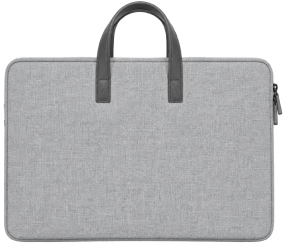
FREE Tech Organiser and Carry case
TriView packs into one compact, protective case, so your workspace goes wherever you do. Just unfold both screens, extend the kickstand, and you’re good to go.
CLAIM OFFER NOW
Works with any Mac with an M1 chip or later, or any Windows laptop running Windows 10 or later. Install the driver once, plug in one USB-C or USB-A cable to power both screens, and get to work.
CLAIM OFFER NOW
Keep your documents, messages, and tools open side by side, so you can read, write, and compare without constantly switching tabs or losing your focus.
CLAIM OFFER NOW


BLACK FRIDAY DEAL - LIMITED TIME
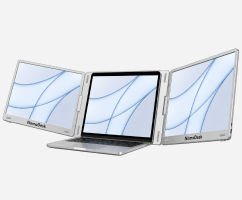
TriView Screens
Two additional screens that connect to your laptop with one cable.
 ×1
FREE Tech Organiser
Keep all your tech organised in one place.
 ×1
FREE Carry Case
Carry case to protect screens and your laptop.


Total bundle value
$1,287
Save $638
Only $649
GET BLACK FRIDAY OFFER NOW

1-Year Warranty
30-Day Returns


Rated 4.8 · Loved by 75,000+
Save big this Black Friday. The TriView lets you work across 3 screens with just one cable, & folds down flat so you can take it anywhere.
CLAIM OFFER NOW
2 FREE GIFTS
FREE Tech Organiser and Carry case
TriView packs into one compact, protective case, so your workspace goes wherever you do. Just unfold both screens, extend the kickstand, and you’re good to go.
CLAIM OFFER NOW
Works with any Mac with an M1 chip or later, or any Windows laptop running Windows 10 or later . Install the driver once, plug in one USB-C or USB-A cable to power both screens, and get to work.
CLAIM OFFER NOW
Keep your documents, messages, and tools open side by side, so you can read, write, and compare without constantly switching tabs or losing your focus.
CLAIM OFFER NOW
BLACK FRIDAY DEAL - LIMITED TIME
TriView Screens
Two additional screens that connect to your laptop with one cable.
×1FREE Tech Organiser
Keep all your tech organised in one place.
×1FREE Carry Case
Carry case to protect screens and your laptop.


Total bundle value
$1,287
Save $638
Only $649
GET BLACK FRIDAY OFFER NOW
1-Year Warranty
30-Day Returns
Put TriView to work and see the difference for yourself. If it’s not right for you, return it within 30 days for a full refund. If it develops a fault within the first year, we’ll repair or replace it.
CLAIM OFFER NOW


Yes—turn one laptop into a three-screen workspace, so your documents, messages, and work stay in view. TriView fits 12–18 inch laptops and works with Macs with an M1 chip or later, or Windows 10 and later. Not sure about your model? Email support@thenomadesk.com before ordering and get a clear answer.
Just one available USB-C or USB-A connection powers and drives both screens—so you can work across three displays without a desk full of cables. Both cable types are included. Install the driver once, connect the cable, and keep the windows you need open side by side.
Yes, but only once. Follow the included guide to install the driver, then plug in whenever you need more screen space. If you use a company laptop, check with IT before ordering to confirm you can install it. That quick check helps you arrive ready to work.
No—the built-in kickstand carries the full weight of the monitor, so your laptop does not have to hold up the extra screens. You get a supported workspace for reading, writing, and comparing side by side, without relying on your laptop’s hinge to carry the load.
TriView weighs 1.8 kg including cables and folds to just 3 cm thick—slightly bigger than your laptop. Pack it in its protective carry case and take your three-screen workspace with you. It is a practical way to keep your workflow together when you move between desks or travel for work.
Usually, no. Most laptops can power both screens through the same cable, so you can get to work without searching for another outlet. If your battery is low, or your laptop has limited power, connect its charger to keep power consistent while you work.
Yes—keep your laptop connected to its own charger while you use TriView, so a low battery does not interrupt your workflow. You will need an available charging connection alongside the USB-C or USB-A connection for the screens. Check your laptop’s ports before ordering to confirm your setup.
You do not have to figure it out alone. Start with the included step-by-step setup guide. If a driver or display setting holds you up, email support@thenomadesk.com for help from the NomaDesk team—so you can get both screens working and get back to the work you bought them for.
Yes—try TriView with your own laptop, your own apps, and your normal workday. You have 30 days to see whether the extra screen space works for you. If it is not the right fit, email NomaDesk within 30 days of delivery to arrange a return.
Your TriView is covered if it develops a fault within the first 12 months. NomaDesk will repair or replace it, giving you a clear path to support after your purchase. You can put it to work with added peace of mind; see the warranty policy for full terms.
Put TriView to work and see the difference for yourself. If it’s not right for you, return it within 30 days for a full refund. If it develops a fault within the first year, we’ll repair or replace it.
SHOP DEALS NOW
Yes—turn one laptop into a three-screen workspace, so your documents, messages, and work stay in view. TriView fits 12–18 inch laptops and works with Macs with an M1 chip or later, or Windows 10 and later. Not sure about your model? Email support@thenomadesk.com before ordering and get a clear answer.
Just one available USB-C or USB-A connection powers and drives both screens—so you can work across three displays without a desk full of cables. Both cable types are included. Install the driver once, connect the cable, and keep the windows you need open side by side.
Yes, but only once. Follow the included guide to install the driver, then plug in whenever you need more screen space. If you use a company laptop, check with IT before ordering to confirm you can install it. That quick check helps you arrive ready to work.
No—the built-in kickstand carries the full weight of the monitor, so your laptop does not have to hold up the extra screens. You get a supported workspace for reading, writing, and comparing side by side, without relying on your laptop’s hinge to carry the load.
TriView weighs 1.8 kg including cables and folds to just 3 cm thick—slightly bigger than your laptop. Pack it in its protective carry case and take your three-screen workspace with you. It is a practical way to keep your workflow together when you move between desks or travel for work.
Usually, no. Most laptops can power both screens through the same cable, so you can get to work without searching for another outlet. If your battery is low, or your laptop has limited power, connect its charger to keep power consistent while you work.
Yes—keep your laptop connected to its own charger while you use TriView, so a low battery does not interrupt your workflow. You will need an available charging connection alongside the USB-C or USB-A connection for the screens. Check your laptop’s ports before ordering to confirm your setup.
You do not have to figure it out alone. Start with the included step-by-step setup guide. If a driver or display setting holds you up, email support@thenomadesk.com for help from the NomaDesk team—so you can get both screens working and get back to the work you bought them for.
Yes—try TriView with your own laptop, your own apps, and your normal workday. You have 30 days to see whether the extra screen space works for you. If it is not the right fit, email NomaDesk within 30 days of delivery to arrange a return.
Your TriView is covered if it develops a fault within the first 12 months. NomaDesk will repair or replace it, giving you a clear path to support after your purchase. You can put it to work with added peace of mind; see the warranty policy for full terms.


